

People use “the cloud” to mean everything online, but storage and computing are different jobs. This guide explains both in plain language, shows how they work together, and helps you decide which one you need.
Cloud storage
Where your data lives.
Cloud computing
Where work gets done with that data.
For a business-focused take on the same distinction, see Box’s overview.
What Is Cloud Computing?
Cloud computing means using someone else’s computers over the internet instead of owning and running your own. Those machines sit in large data centers run by companies like Amazon, Microsoft, and Google. NIST defines it as on-demand network access to a shared pool of computing resources that can be provisioned and released quickly with minimal management effort. You rent processing power, software, or both, and pay for what you use, a model Everpure calls pay-as-you-go.
An everyday analogy: electricity. You don’t build a power plant in your backyard. You plug into the grid, use what you need, and pay at the end of the month. Cloud computing works the same way, except the “power” is computing: running apps, crunching numbers, hosting websites, or training AI models.
When you edit a Google Doc, stream a show, or join a video call, a remote server does the heavy lifting. Your device mostly displays the result.

What Is Cloud Storage?
Cloud storage saves your files on remote servers instead of on your own device. You upload photos, documents, or videos, and open them from any phone or computer with an internet connection.
An everyday analogy: a self-storage unit for your digital belongings. It keeps things safe and reachable, but it doesn’t do anything with them.
Google Drive, Dropbox, iCloud, and OneDrive are the best-known examples. Companies also use cloud storage for backups, archives, and sharing large files, as Box’s guide explains.
Cloud Storage vs. Cloud Computing: Key Differences
| Feature | Cloud storage | Cloud computing |
|---|---|---|
| Main job | Keeps data safe and accessible | Runs applications and processes data |
| You rent | Storage space (GB, TB) | Processing power (CPU, memory, GPU) |
| Nature | Passive: data sits and waits | Active: work is being performed |
| Typical uses | Backups, file sharing, archives, photo libraries | Hosting websites, running apps, data analysis, AI |
| Who uses it | Individuals and businesses | Mostly businesses and developers |
| Cost based on | Data stored (plus data transferred out) | Time or capacity used (hours, requests) |
| Examples | Google Drive, Dropbox, Amazon S3 | AWS EC2, Azure Virtual Machines, Google Cloud Run |
The quick test: if you’re only keeping or sharing files, that’s storage. If something is running, calculating, or being served to users, that’s computing. SPEC Innovations draws a similar passive-versus-active line.
How Cloud Storage and Cloud Computing Work Together
In real life you almost never use one without the other. Storage holds the data, and computing acts on it.
Netflix stores its video library in the cloud and delivers it through its own content delivery network, Open Connect, with servers placed close to viewers so streaming stays fast. It also runs large-scale analytics to predict what viewers in each region will want, and that analysis is cloud computing. Everpure walks through this example, and AWS’s Netflix case study shows the scale.

Gmail works the same way. Your emails and attachments sit in cloud storage. When you search your inbox, filter spam, or sort messages into tabs, that’s cloud computing.
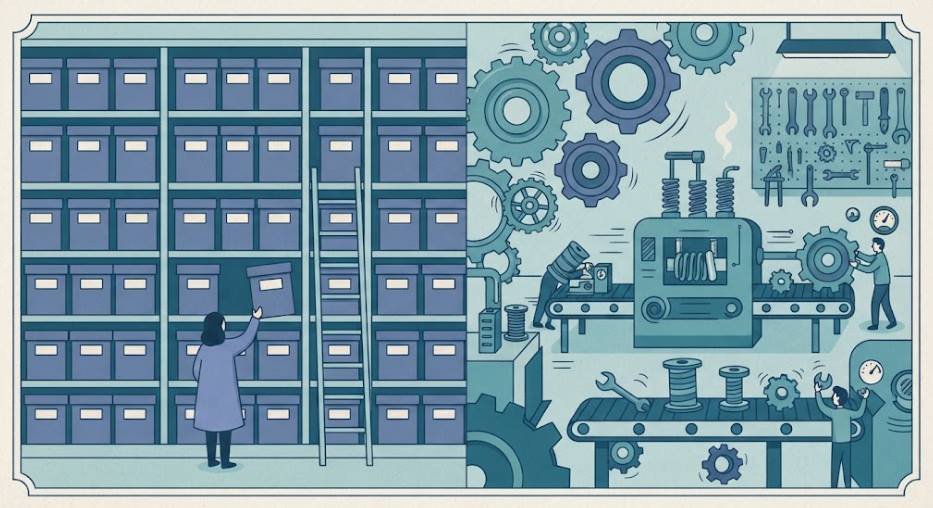
Think of it this way: storage is the library, and computing is the reader. A bunch of books without a reader just sit there, and a reader with no books has nothing to do. You need both to get anything done.
Examples You Use Every Day
Cloud storage
- Photos backed up to iCloud or Google Photos
- Files saved in Google Drive, OneDrive, or Dropbox
- Chat and voice-note backups
- A company’s backup archive in Amazon S3
Cloud computing
- Editing a spreadsheet with teammates in real time
- Streaming music or video
- Using an AI chatbot or translation tool
- Online banking and shopping at scale
- Zoom or Teams video calls
- A developer launching a server on Amazon EC2
Most of these are a blend. Even a simple photo backup uses a little computing to compress, sort, and recognize pictures. Box lists more business use cases for each side.

Which One Do You Need? A Simple Decision Guide
- “I need a safe place for files or phone backups.” Choose cloud storage.
- “I need to share large files.” Choose cloud storage.
- “I want to run an app, host a website, or process data.” Choose cloud computing.
- “I want to analyze a big pile of stored data.” You need both.
- “I’m building something that must handle many users or traffic spikes.” Choose cloud computing, with storage behind it.
Rule of thumb: individuals mostly need storage; businesses and developers usually need both. If you’re unsure, start with storage, which is simpler and cheaper, and add computing when you have work to run. Accrets offers a more technical decision flow for teams.
Is Google Drive Cloud Computing or Cloud Storage?
Primarily cloud storage. Its core job is keeping files and letting you access and share them from anywhere. Google’s support page describes it as part of the storage shared across Gmail, Photos, and Drive.
It does include computing features, like file previews, search inside documents, and editing in Docs and Sheets. Those are cloud-based apps, so they’re technically cloud computing, but the product you’re buying is storage. The same goes for Dropbox, iCloud, and OneDrive. Accrets reaches the same conclusion in its FAQ.
Types of Cloud Storage (Object, File, Block)
Providers offer three main types. Salesforce Trailhead’s AWS module is a good beginner reference.
Object storage
Data is kept as individual “objects” (a file plus its descriptive information) in a flat structure. It scales enormously and is cheap, so it suits photos, videos, backups, and archives. Amazon S3 is the best-known example.
File storage
Data is organized in folders and subfolders, like the files on your computer. It’s easy to understand and good for shared team drives. Google Drive and network file shares are examples.
Block storage
Data is split into fixed-size blocks that act like a hard drive attached to a server. It’s fast, so it suits databases and virtual machines. Amazon EBS is an example.
Types of Cloud Computing (IaaS, PaaS, SaaS, Public, Private, Hybrid)
Cloud computing is described by service model (how much you manage) and deployment model (who can use the infrastructure). Both come from the NIST definition.
Service models
- IaaS (Infrastructure as a Service): you rent raw servers, storage, and networking and build on top. Most control, most responsibility. Examples: AWS EC2, Azure Virtual Machines.
- PaaS (Platform as a Service): a ready-made environment to build and run apps without managing servers. Examples: Google App Engine, Azure App Service.
- SaaS (Software as a Service): finished software used through a browser or app. Examples: Gmail, Salesforce, Zoom.
Mindcore and ReadySpace both explain who each model suits.
Deployment models
- Public cloud: shared across many customers and run by a provider such as AWS, Azure, or Google Cloud.
- Private cloud: used by one organization, on its own premises or hosted for it.
- Hybrid cloud: a mix, so sensitive workloads stay private while others use the public cloud.
- Community cloud: shared by organizations with common needs, such as government agencies.
Advantages and Disadvantages of Cloud Storage
Advantages
- Access anywhere on any device with internet
- Automatic backup if a phone is lost or broken
- Easy sharing with a link, not a giant attachment
- Scalable: add space without buying hardware
- Low upfront cost: no drives or servers
Disadvantages
- Needs internet unless files are synced offline
- Ongoing fees once free space runs out
- Security risk from weak passwords or bad sharing settings
- Provider dependence: outages or account lockouts
- Slow transfers for very large files
Turn on two-factor authentication and keep a second backup of anything critical to reduce most of these risks. Box covers the benefits in more depth, and Everpure explains why cloud scaling beats buying hardware.
Do You Have to Pay for Cloud Storage?
Not always, but most people eventually do. Major providers offer a free tier, then charge for more space.
- Google: 15 GB free per account, shared across Gmail, Drive, and Photos.
- Apple iCloud: 5 GB free, with paid upgrades above that.
- Dropbox: 2 GB free.
- OneDrive: 5 GB free. Check their pricing pages for current limits.
Paid plans are usually a monthly or yearly subscription based on the space you pick, often with extras like family sharing. Google may delete content if an account stays over quota for two years, per its support documentation.

To stay on the free tier longer: delete large duplicates, clear old email attachments, compress videos, and spread files across providers.
Cloud Computing vs. Cloud Storage Pricing: What Drives the Cost
The two are billed differently, which surprises many first-time business users.
Storage cost depends on
- Data stored, priced per GB per month
- Storage tier: hot data costs more than cold or archive data
- Data transfer out (egress)
- Reads and writes on some services
Computing cost depends on
- How long resources run, often by the hour or second
- Size and power: GPUs cost more than small servers
- Usage model: on-demand, reserved, or serverless
- Data transfer and extras like databases and load balancers
This S3 pricing breakdown shows how storage class, requests, retrieval fees, and transfers combine on a real bill, and CloudForecast covers the same pillars. Accrets shows when serverless beats an always-on server.
Practical tips
- Shut down computing resources you aren’t using, because they bill while running.
- Move old data to cheaper archive tiers.
- Keep storage and computing in the same region to avoid transfer fees.
- Set billing alerts so a mistake doesn’t become a surprise invoice.
Frequently Asked Questions
What is cloud computing in simple terms?
It’s renting computing power and software over the internet instead of owning the hardware. You use what you need and pay only for that. See the NIST definition for the formal version.
What is the difference between “cloud” and “cloud computing”?
“The cloud” is the general term for servers and services reached over the internet. Cloud computing is the practice of using those remote resources to run software and process data. Cloud storage is one service within the cloud. Box notes the terms are often used interchangeably.
What is an example of cloud computing?
Gmail, Netflix, Zoom, Google Docs, and online banking apps. For businesses, launching a server on AWS or hosting a site on Google Cloud are common ones.
Can you give me 10 examples of cloud computing?
Gmail, Google Docs, Netflix, Spotify, Zoom, Microsoft 365, Salesforce, Slack, Shopify, and Amazon Web Services.
Is Google Drive cloud computing?
Mainly it’s cloud storage. It includes cloud-based apps like Docs and Sheets, but its core purpose is storing and sharing files, as Accrets also concludes.
What are the three main types of cloud storage?
Object, file, and block storage. Trailhead explains each with examples.
What are the four types of cloud computing?
By deployment: public, private, hybrid, and community cloud. By service model: IaaS, PaaS, and SaaS, and some lists add serverless as a fourth. Both breakdowns appear in the NIST definition.
Is cloud computing easy for beginners?
Using Drive or Gmail is very easy. Building on AWS or Azure has a steeper learning curve, but courses, free tiers, and hands-on labs make it approachable. Trailhead is one free place to start.
Do I really have to pay for cloud storage?
No. Free tiers exist, such as Google’s 15 GB, and many people stay on them. You only pay when you need more space or extra features.
What are 5 disadvantages of cloud storage?
- It needs internet access
- Costs add up over time
- Your data sits on a third party’s servers
- You depend on the provider’s uptime and policies
- Large transfers can be slow
What’s the difference between cloud storage and cloud computing?
Cloud storage keeps your data. Cloud computing processes it and runs applications. Most real-world systems use both, as in the Netflix example.
Final Thoughts
Storage is where your data lives; computing is the engine that works with it. If you only need to keep, back up, and share files, cloud storage is enough. If you need to run apps or analyze data, you’ll need computing too. Either way you pay for what you use, so match the service to the job.
[…] in, it helps to understand the basics of storage, so see what cloud storage is and how it works and how cloud storage differs from cloud computing. The U.S. Cybersecurity and Infrastructure Security Agency (CISA) also recommends regular backups […]
[…] Storage keeps your files, while computing runs software and services online. Our comparison of cloud storage vs cloud computing explains the difference in plain […]
[…] on more than one service. If you are mixing up cloud storage with cloud computing, our post on cloud storage vs. cloud computing clears up the […]